Sharing Documents with an Outside Party: The Alternative to an Email Attachment
What an organisation gives up when it emails a contract as an attachment, and how Warqa shares a document externally with a private link, a verification code, an expiry date and a watermark naming the recipient.
The procurement department sends a draft supply contract to three suppliers and asks for their offers. The draft is an email attachment, and it states the expected quantities and the payment terms. Two weeks later a fourth supplier, never on the list, calls with a price built on the same quantities. One of the three forwarded the file, and there is no way to tell which.
The example is an illustration, not one client's story, but it recurs with contracts, offer letters and payroll sheets. This article covers what an organisation gives up when it sends a document as an attachment, and how external sharing works in Warqa.
What the organisation gives up on sending
An attachment is a copy that leaves its owner's hands. After sending, the sender cannot take it back and does not know whether the recipient opened it. If the recipient forwards it, the new party receives an identical copy with no trace of who passed it on.
There is a quieter problem too. When the organisation amends the contract after sending it, the old copy stays in the recipient's mailbox. A month later they may review it and act on it, believing it is the latest.
A private link for each recipient
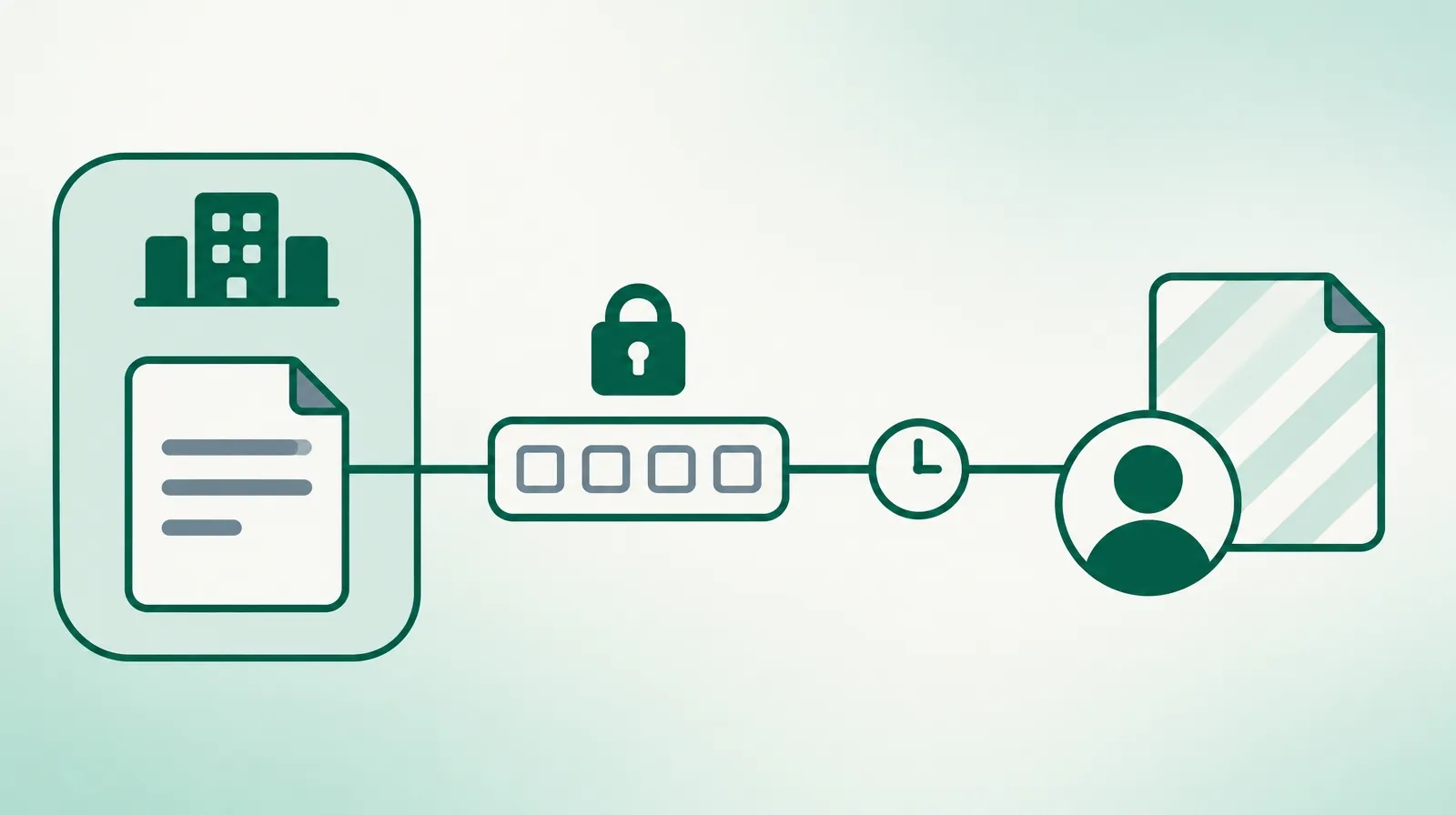
In Warqa, a user who holds the sharing permission opens the document and adds the recipients by name and email. The user sets an expiry date for the share and can write a note. The default period is seven days, and the organisation can change it.
Each recipient gets a link of their own, delivered in an email that states the expiry date and the note. Had procurement shared the draft this way, each of the three suppliers would have had a separate link and a separate record.
A verification code before the document opens
The link alone does not open the document. When the recipient opens it, Warqa emails them a four-digit verification code, valid for ten minutes. After five wrong attempts the code is refused.
A forwarded link therefore loses its value. Whoever receives it second-hand needs access to the original recipient's mailbox to get the code. After verification the session lasts three hours, and then Warqa asks for a new code.
The downloaded copy carries the recipient's email
When the recipient downloads the file, Warqa stamps it with a watermark showing their email address and stores a tracking number for that download inside the file. If the copy later appears where it should not be, the organisation knows which share it came from.
A watermark does not prevent a leak. It tells the recipient that the copy is attributed to them. That deters someone who would forward a file without thinking, and it does not deter someone who has decided to leak.
The watermark works on PDF files and images only. A Word or Excel file downloads as it is, so convert a document to PDF before sharing it outside the organisation.
What the owner sees after sharing
The document's share list shows the status of each share: not opened yet, opened, expired or revoked. Next to the status are the time of first and last access, the number of opens and downloads, and the last IP address it was opened from.
These details have practical uses. A supplier who has not opened the draft two days before offers are due needs a call. A share opened twenty times in one day deserves a question.
The user can revoke a share at any time, and the link stops working immediately. The invitation email can be resent while the share is active. The activity log keeps everything that happened: the share being created, the code sent, the verification, each open, each download, and the revocation.
The link serves the current file
A share link serves the document's file as it is at the time of download. If the organisation replaces the file after sharing, the recipient downloads the new one. The other party is not left holding an old draft they believe is final, as long as they return to the link.
This cuts the other way as well. If the organisation wants the recipient to see one specific version, it should not replace the file before the share ends.
When email is enough and when to share
A link and a verification code are more than some documents need. A company brochure or a blank form can go as an attachment with no harm. One question decides: what happens if this file reaches a third party?
If the answer is a weaker negotiating position, exposed employee data, or a commitment not yet signed, share it. Draft contracts, price offers, payroll sheets and board minutes all belong here. For the rest, email is faster, and there is no reason to complicate what carries no risk.
Limits worth knowing
A share has no password, and verification is by a code sent to email only, not by SMS. Anyone with access to the recipient's mailbox can open the document. Give a share to a named person's address, not to a general address that a whole department reads.
There is no view-only option and no limit on the number of downloads. A verified recipient can download the file.
The document's owner receives no alert when the recipient opens the link. To follow up, check the share list.
Before the next share
Choose an expiry date that matches the need. A week is enough for a request for quotation, and two days are enough for a draft review. A share left open for three months is one its owner forgot.
When the transaction ends, revoke the shares that are still active. It helps for the contracts officer to review the active shares once a week and ask of each: does this party still need this document?
External sharing is one layer of several. Protecting contracts and documents from leaks covers the layers inside the organisation, and the contract lifecycle explains what happens to a contract once both sides agree. To review how your documents are shared on Warqa, contact the team.